
SELMA supports Australian RTOs with automated AVETMISS file generation, built-in validation, and reporting readiness across the training lifecycle.
This guide explains how to:
• Understand AVETMISS reporting requirements
• Configure your data correctly in SELMA
• Generate compliant AVETMISS files
• Validate and resolve common errors
• Submit accurate data to NCVER and state authorities
It is designed for compliance officers, administrators, and reporting staff responsible for AVETMISS submissions.
In this Section:
- What is AVETMISS?
- How AVETMISS Reporting Works in SELMA
- Understanding Program Recognition
- Accessing AVETMISS Reporting in SELMA
- Understanding the AVETMISS Index
- Creating a New AVETMISS Report
- Basic Settings
- Filter Options
- Generating the Report
- Validation Process
- Generating Final Files
- Files Included in AVETMISS Exports
- Downloading Reports
- Re-running Reports
- Program and Component Configuration for AVETMISS Reporting in SELMA
- Configuring Unit-Only Courses
- Automatic System Processing
- Reporting Best Practice
- End-to-End Reporting Process
- Compliance Reminder
What is AVETMISS?
Australian Vocational Education and Training Management Information Statistical Standard (AVETMISS) is the national framework for collecting and reporting vocational education and training activity in Australia.
Registered Training Organisations (RTOs) are required to submit AVETMISS data to:
• The National Centre for Vocational Education Research (NCVER), and/or
• Their relevant State Training Authority
This data is used for:
• National reporting and statistics
• Funding reconciliation
• Regulatory monitoring
• Sector planning
Accurate AVETMISS reporting is a regulatory obligation.
How AVETMISS Reporting Works in SELMA
SELMA generates AVETMISS files by extracting data from:
• Student records
• Enrolment records
• Course and unit configuration
• Compliance settings
The system then:
• Validates the data
• Identifies errors and warnings
• Generates standard NAT files
• Packages files for submission
All AVETMISS reporting in SELMA follows this process.
Understanding Program Recognition (Critical Concept)
Before generating reports, it is essential to understand how training activity is classified. In AVETMISS, the Program Recognition Identifier tells government systems what type of training the student is enrolled in. There are three main categories.
1. Qualifications (Full Courses)
Examples:
• Certificate III
• Certificate IV
• Diploma
These are:
• Full AQF qualifications
• Issued under qualification codes (e.g. BSB40120)
Use:
• Nationally accredited qualification specified in a national training package
Only select this when delivering a full qualification.
2. Skill Sets
Examples:
• HLTSS00068
These are:
• Bundled groups of units
• Not full qualifications
• Still nationally recognised
Use:
• Nationally recognised skill set
Only select this when approved on scope.
3. Standalone Units (Statement of Attainment)
Examples:
• HLTAID009
• HLTAID011
These involve:
• Individual units only
• No qualification
• No skill set
They are:
• Nationally recognised
• VET training
• Issued as Statements of Attainment
Use:
• Nationally recognised unit(s) of competency or
• Statement of Attainment / Non-AQF
This applies to the short-courses.
Why Program Recognition Matters
If program recognition does not match delivery:
• Enrolment records may not be generated
• Validation errors may occur
• Submissions may be rejected
• Audit risk increases
Always ensure the selected recognition reflects:
• Approved scope
• Actual delivery
• Issued certification
Accessing AVETMISS Reporting in SELMA
Access to AVETMISS reporting in SELMA is permission-based.
User Permissions
AVETMISS reporting access is controlled through User Roles.
To review or update access for a user:
Navigate to Settings → Roles and Permissions → Edit Role
- To learn more please refer to System Users – User Roles and Permissions
The Compliance section remains visible to all users, however the ability to generate, edit, or re-run AVETMISS reports depends on the permissions enabled for their Role.
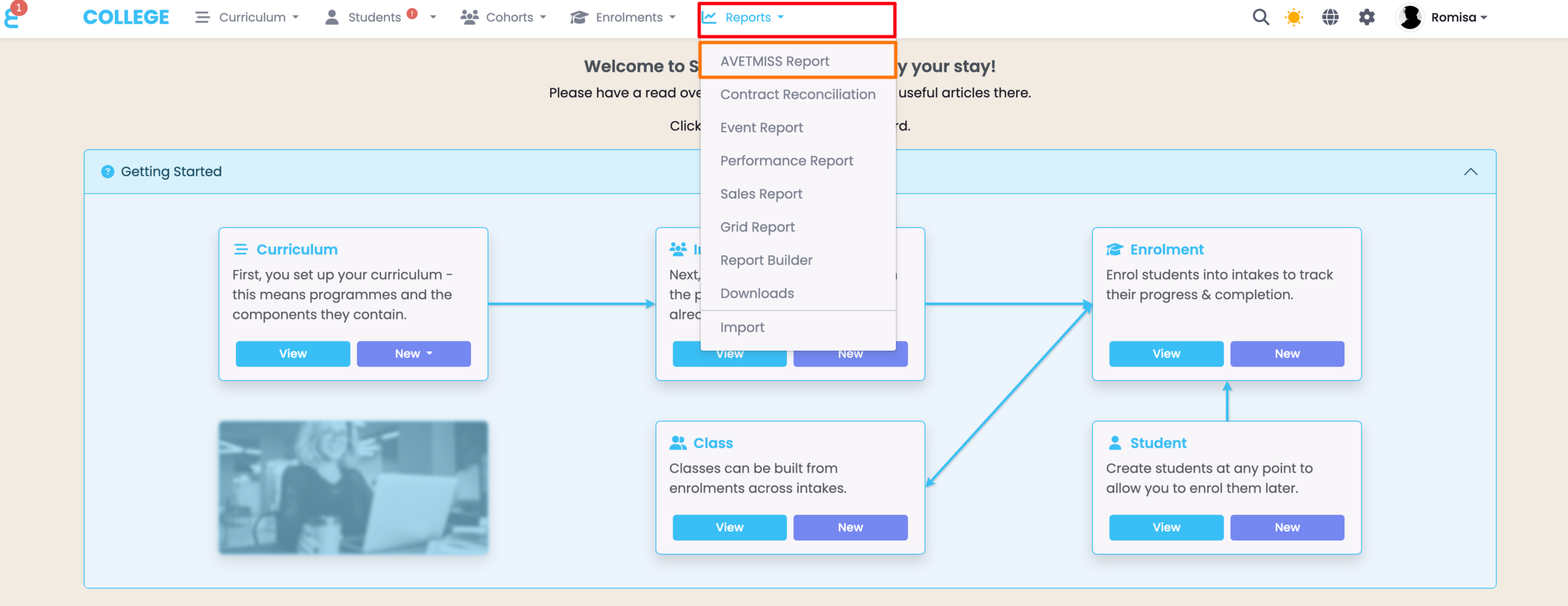
Figure 1: Navigate to Reports > AVETMISS Report
Understanding the AVETMISS Index
When opening AVETMISS report, the system displays previously generated reports.
Figure 2. AVETMISS Report Index
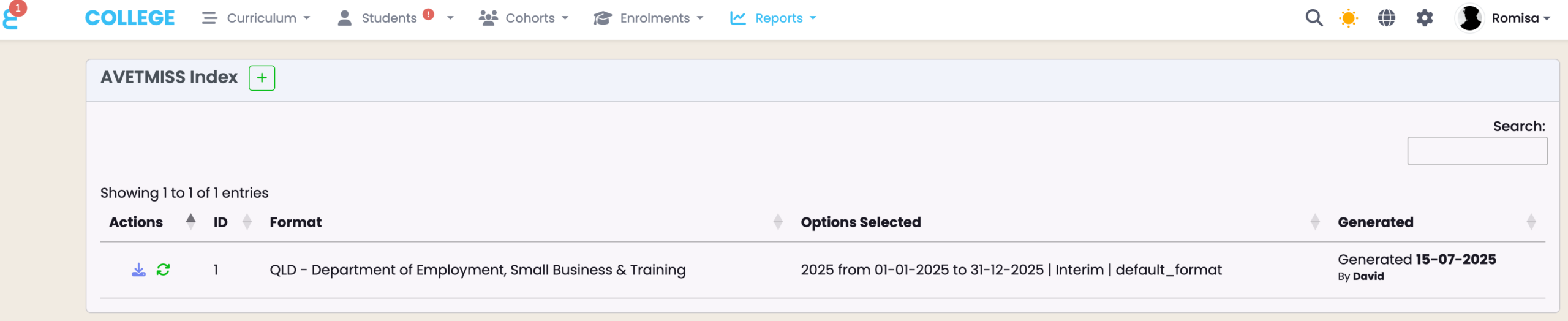
Available Actions
• Download
• Download and email
• Refresh (re-run report)
Creating a New AVETMISS Report
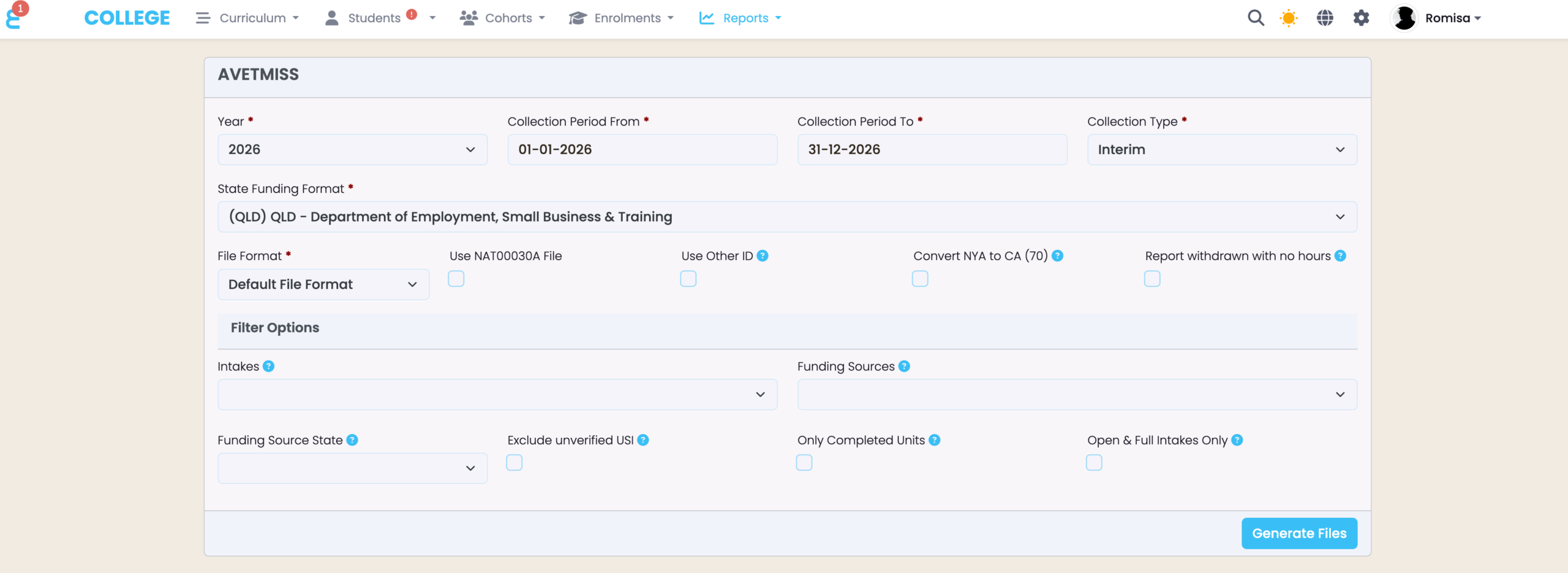
The report form contains:
• Basic Settings
• Filter Options
Figure 3: Create New AVETMISS Report
Click the “+” button to start a new report.

Basic Settings
Reporting Period
Fields:
• Year
• From
• To
• Type (Interim / End of Year)
Dates are restricted to the selected year.
State Format
Select the format required by your funding authority.
File Options
Figure 4. Fill the Required Details
Filter Options
Filters allow you to narrow the reporting dataset.
Common uses:
• Reporting specific cohorts
• Excluding unverified USIs
• Limiting to completed units
Figure 5: AVETMISS filter options
Generating the Report
Click Generate Files.
SELMA will:
• Create the report record
• Start validation
• Display the validation screen
Validation Process
Initial Validation
During validation, the system checks:
• Mandatory fields
• Code validity
• Data relationships
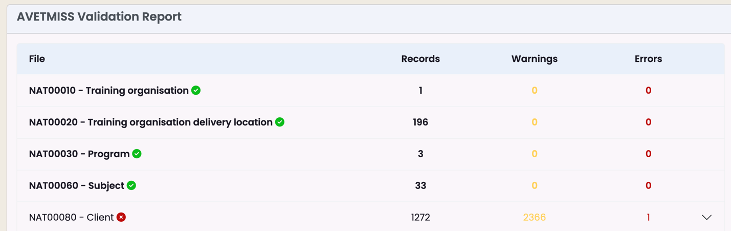
Validation Results
Each NAT file is displayed with:
• Record count
• Warnings
• Errors
Viewing Errors
Expanding a file display:
• Affected record
• Field
• Error description
• Resolution guidance
Figure 6: AVETMISS Validation Errors
Generating Final Files
If no errors remain, click Generate.
If errors exist:
• Fix data
• Re-validate
• Avoid generating with errors
Files Included in AVETMISS Exports
NAT files include:
• NAT00010 – Organisation
• NAT00020 – Locations
• NAT00030 – Programs
• NAT00060 – Units
• NAT00080 – Clients
• NAT00085 – Contacts
• NAT00090 – Disability
• NAT00100 – Prior Education
• NAT00120 – Enrolments
• NAT00130 – Completions
All files are delivered in a ZIP package.
Downloading Reports
After generation:
• Report appears in list
• Download link created
• Email sent
• ZIP file available
Re-running Reports
Use refresh when:
• Errors are corrected
• Data changes
• Updates are required
The same settings are reused.
Program and Component Configuration for AVETMISS Reporting in SELMA
In SELMA, AVETMISS compliance is configured at two levels:
• Program level – defines how the training offering is recognised for AVETMISS reporting (qualification, skill set, or unit-only delivery).
• Component level – defines the individual units or modules delivered under the program.
Both levels must be configured correctly for enrolments to generate and report successfully.
The example below demonstrates unit-only delivery (Statement of Attainment).
Providers delivering full qualifications or skill sets follow the same process, with different program recognition values selected at the program level.
Configuring Unit-Only Courses
After creating your program, add your unit (component) and configure the AVETMISS fields as follows.
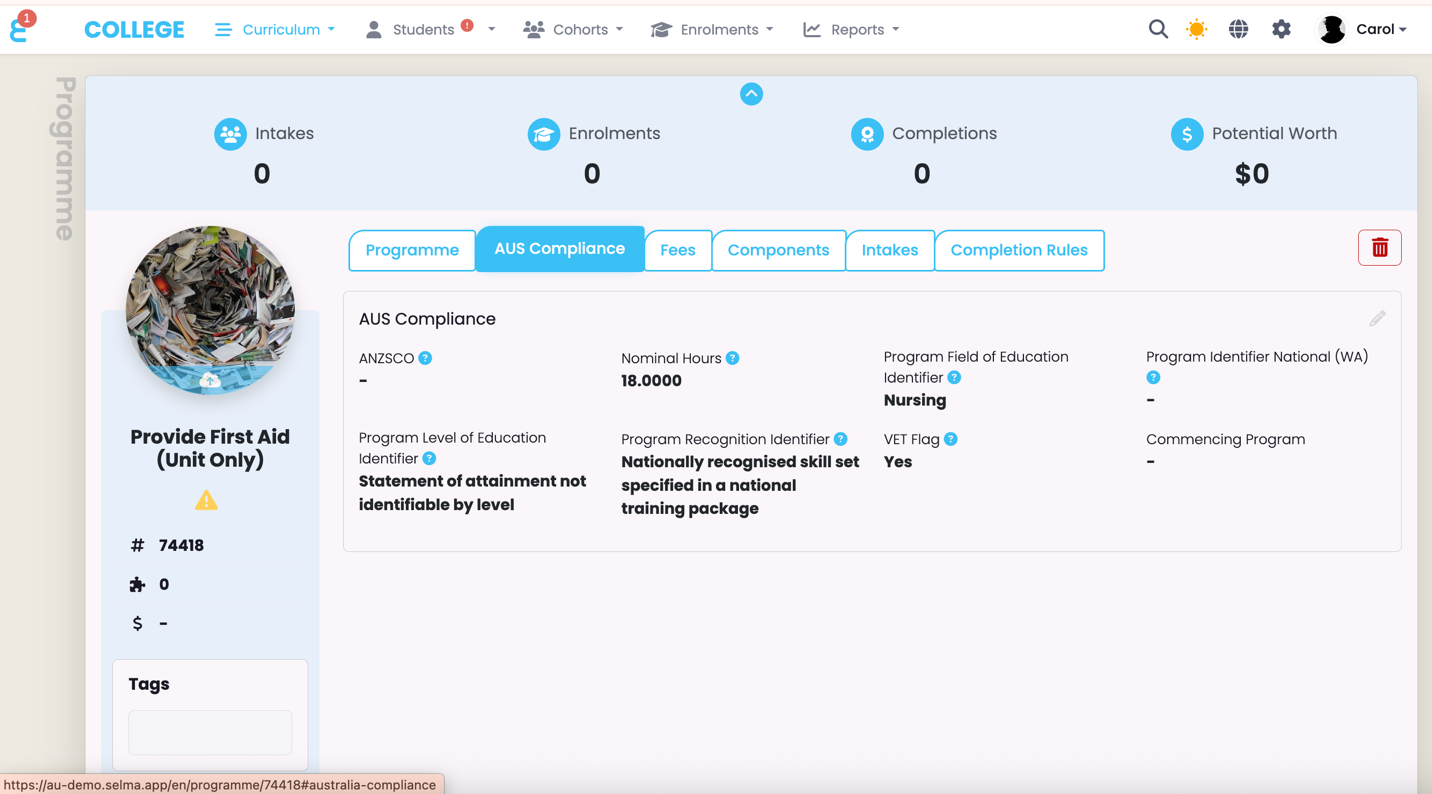
Navigate to:
Curriculum Index → Open your program → AUS Compliance
Confirm:
- Program Recognition: Units / Statement
- VET Flag: Yes
- Field of Education: Select the appropriate
- Program Level: Statement of Attainment
- Nominal Hours: As per course
- Commencing Program: Subject-only
Automatic System Processing
During AVETMISS report generation, SELMA automatically applies required system-derived values, including survey contact status and certain reporting indicators.
These values are populated based on system logic and existing enrolment data and do not require manual configuration.
This ensures consistency and compliance with AVETMISS reporting rules.
Reporting Best Practice
To maintain accurate and compliant AVETMISS submissions, training providers should review validation results carefully and resolve any errors before submission. Where changes are made, reports should always be re-validated to ensure updated data is reflected correctly.
Maintaining clean course and unit configuration is essential for consistent reporting outcomes. Providers should also regularly monitor USI verification status and review short-course setup, particularly where delivery models change.
End-to-End Reporting Process
The AVETMISS reporting process in SELMA follows a consistent sequence.
• Open AVETMISS
• Create new report
• Configure settings
• Generate files
• Review validation
• Fix errors
• Generate final files
• Download ZIP
• Submit to authority
Compliance Reminder
AVETMISS reporting must always align with the organisation’s scope of registration, delivery model, and issued certification.
Incorrect or inconsistent configuration may result in rejected submissions, audit findings, or funding impacts. Providers should ensure compliance settings are reviewed regularly and always maintained accurately.