
Features/Improvements
Public Trust Integration
Integration with Public Trust Fee Protect, enabling NZ providers to submit student fee data directly from SELMA.
Email 2-Way Conversations (BETA)
Added ability to have replies to emails sent from within SELMA to appear back in SELMA. These inbound replies can also be responded to from within SELMA. This is only available when using the Microsoft email integrations.
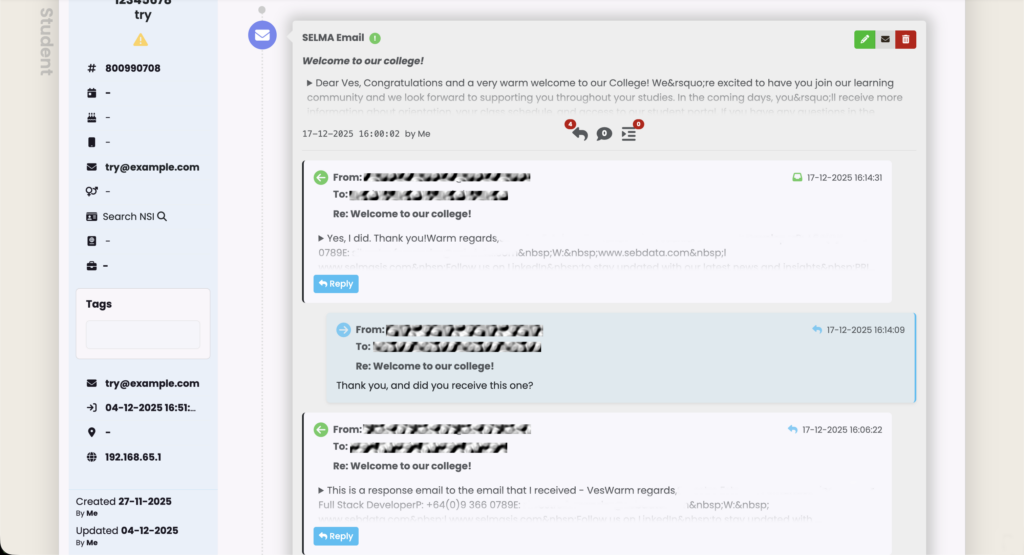
Note: There are new permissions required in this set-up. Please refer to the following:
Attendance Report CSV Export
Added a new option for exporting attendance data into a CSV file. From the enrolment page you will be able to export that enrolment’s entire attendance history. From an Intake/Class, it will be either day or week. These buttons are moved into an action button, where some of the existing buttons have been moved into also (fullscreen, go to today). When you are on day view, you will see this button. On week view, day button will be hidden and week view displayed. On all sessions view, neither button will be available.
Dashboard Widgets
Added several new dashboard widgets:
- EFTS Enrolled: NZ Specific Dashboard Widget for displaying EFTS enrolled in a two-year comparison format
- Parity Completions: NZ Specific Dashboard Widget showing parity completions current year versus last year, grouped by Māori, Pasifika, and Other
- ILN Hours Delivered: NZ Specific Dashboard Widget showing ILN hours delivered to date, current year versus last year
- ACE Hours Delivered: NZ Specific Dashboard Widget showing ACE hours delivered to date, current year versus last year
- Overdue Events: Dashboard Widget showing overdue events, grouped by user
- Event Based Widget: Dashboard Widget showing how many open tasks compared to total events, grouped by event type
- Unmarked Attendance by Staff Member: Dashboard Widget showcasing unmarked attendance grouped by staff member
- Intakes by Programme: Dashboard Widget showing how many Intakes per Programme in a pie graph graphical display, with hover tooltips displaying percentage of the intakes in an active programme against all intakes across all active programmes, as well as how many Enrolments are active in the programme being hovered on
- Programme Enrolments Race Line Chart: Dashboard Widget showing a “Race Line Graph” of active Enrolments under a Programme, with configurable dates. This defaults to one year ago from the current day. Checks the enrolment each month to check if there is a finished/graduated/withdrawal date present, indicating it is no longer active
Enrolment Improvements
AU: Re-enrolment Credit Transfers: Introduced a new pop-up before the enrolment process to warn users that some students have previously completed the same components. Users can then choose which completion code to use.
Grading Enhancements
Added the ability for a user to select who graded the assignment. If there is no value set then it will default to using the logged in user as the grader. This feature is available from the Bulk Marking screen, on the Enrolment Component Grades Tab. On the enrolments component list there is now also a button to add a grade from the list.
SELMA Forms Enhancements
- URL Parameters: Allow for url query params to pass down to the SELMA form
- Skip Payment Rule: Added a new “Skip Payment” form rule action that allows forms to conditionally bypass the payment checkout based on field values
- Form PDF Improvements: In the SELMA form generated PDF, Intake field now shows ID – Intake – Campus – Start Date. Components will show the structure that is seen in the form itself, i.e. if they select hide sub-components then they will only see the parent-components and vice-versa. Stripe will show if enabled and payment made. If skip payments is enabled but the rule isn’t triggered it will show. If enabled and the rule is triggered then the stripe info will not be shown
Intake and Class Report
Added PDF reports to the intake and class pages.
Export Improvements
Strip HTML tags on grid exports from all tables that have the inbuilt export to CSV functionality.
Report Builder Enhancement
Added Student ID to the Student Entity in Report Builder.
Bug Fixes
Student Importer Date of Birth Timezone
Fixed issue where the student date of birth was affected by the logged-in user’s timezone when importing students.
Intake Bulk Remove Enrolment Components
When bulk removing enrolment components via the Intake, prior to removal check to see if that id is a parent id anywhere, removing said value as the parent id before continuing with deletion.
SELMA Form PDF Custom Field Checkbox
SELMA Form PDF Issue with Custom Field checkbox states has been resolved so form submissions will reflect custom field checkbox states correctly.
SELMA Form Save and Continue Associations
Fixed an issue where empty address, contact, and organisation records were incorrectly created when using the “Save and Continue Later” feature on forms.
Cloud Assess Date Import
It is now configurable whether to use the unit ‘end’ date or ‘completion’ date from Cloud Assess for the enrolment component completion date. By default, it uses the ‘end’ date from Cloud Assess to preserve how it worked prior to this release.
Document List Ordering
Updated the document tree view to ensure consistent ordering.
Deactivate System User Status Display
When deactivating a system user via the UI, these changes are reflected instantly with the user’s status being set to ‘Locked’.
SELMA Form Address Labels
Updated labels on the SELMA Form Address fields. Fixed to ensure the custom set headers show on the address blocks.
SDR Timezone
Fixed the one-day discrepancy in the qualification completion date in the SDR qualification completion file.
Object Scheduler Bulk Handling
Improved object (class/intake) scheduler to be able to handle more records.
Global Search Positioning
Improved the global student search dropdown – it should no longer jump around when you click on a result.