
8. NZQA Qualifications

Table of Contents

NZQA Units & Quals

Import Qualifications

NZQA Qualification Management

NZQA Units & Quals

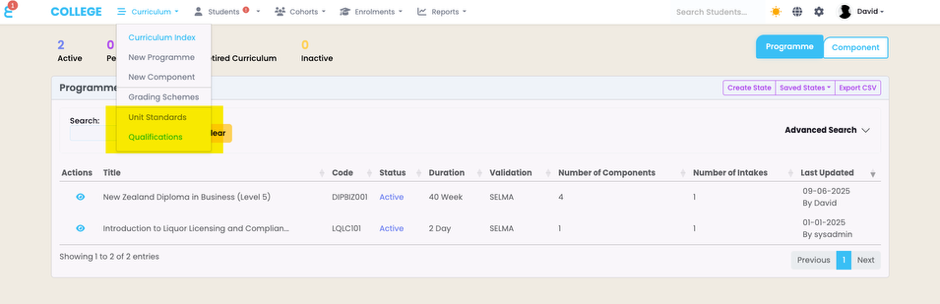
SELMA supports the import and management of NZQA unit standards and qualifications. If enabled in your SELMA instance, you can see Unit Standards and Qualifications under the Curriculum main menu:
A screenshot of a computer

AI-generated content may be incorrect.

Import Qualifications

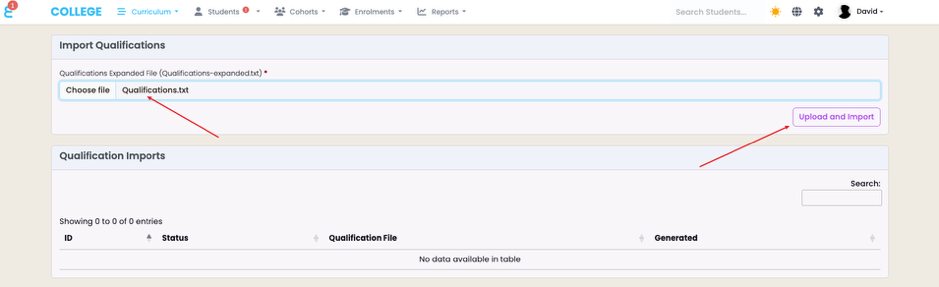
To import the NZQA qualifications navigate to “Curriculum -> Qualification -> Upload Qualifications”. From here, select your qualification file (downloaded earlier under “Import Unit Standards”) and click on “Upload and Import”:
A screenshot of a computer

AI-generated content may be incorrect.

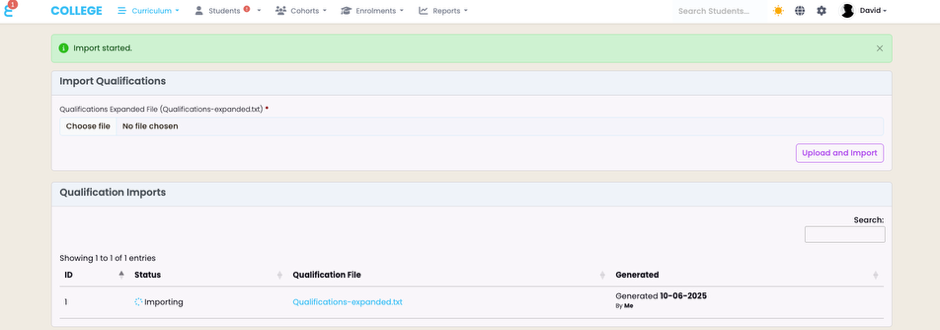
Once again, the import will start and may take up to 20 minutes:
A screenshot of a computer

AI-generated content may be incorrect.

Once the qualifications are successfully imported, the import history will show “Completed”

A screenshot of a computer

AI-generated content may be incorrect.

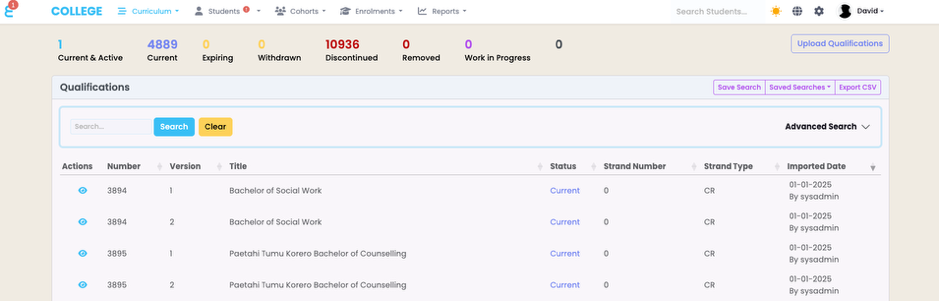
And the qualifications now show up under “Curriculum -> Qualifications”
A screenshot of a computer

AI-generated content may be incorrect.

Note that the import includes ALL qualifications from NZQA and not just qualifications accredited for you provider to deliver. See Qualification Management to learn how to activate and use them.

NZQA Qualification Management

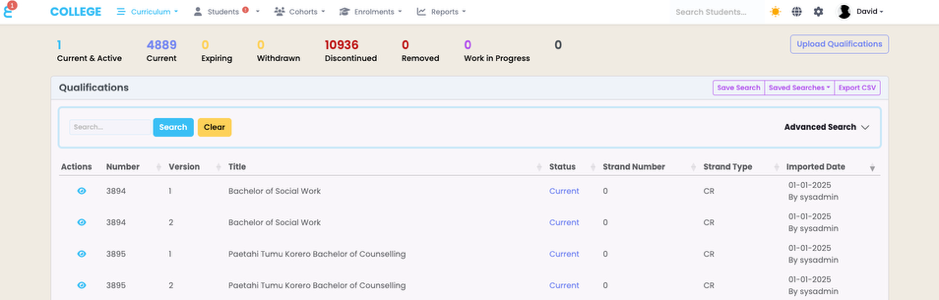
If you navigate to “Curriculum -> Qualifications” you will get to the overview screen of all qualifications accredited by NZQA. The below screen should show if you have successfully imported the qualification file (see earlier in this manual).
A screenshot of a computer

AI-generated content may be incorrect.

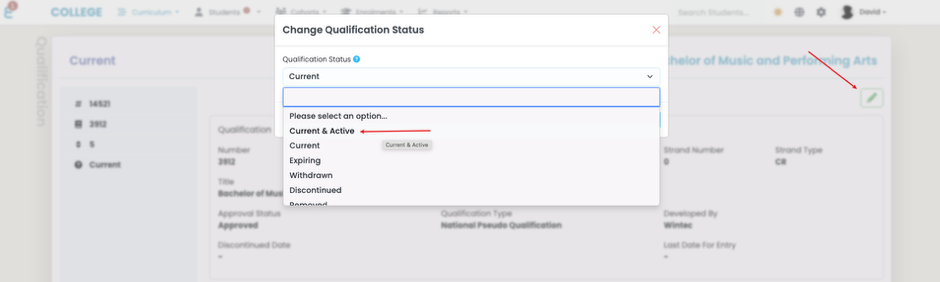
The qualification statuses follow the statuses of NZQA. The status of “Active” or “Current & Active” identifies the qualifications you marked as active for your provider to use.

To mark a Qualification as active, click on the eye button of the qualification. The click on the pencil button and change the status to Active:
A screenshot of a computer

AI-generated content may be incorrect.

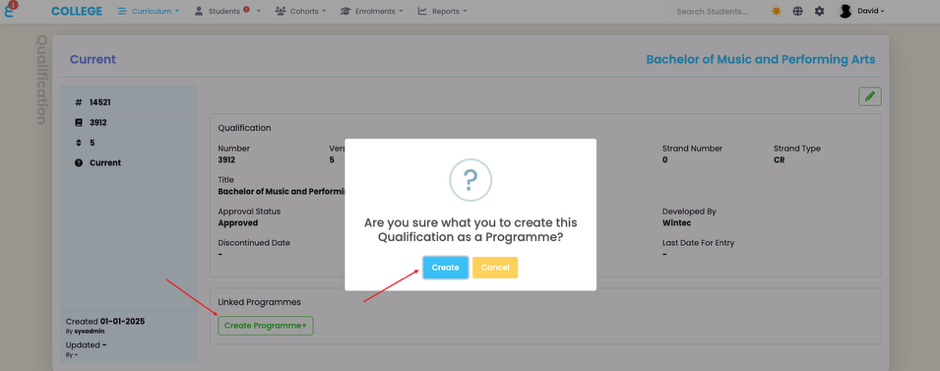
From this screen, you may also create a “Programme” record in SELMA that is automatically linked to the NZQA Qual. Much like with the Unit Standards:
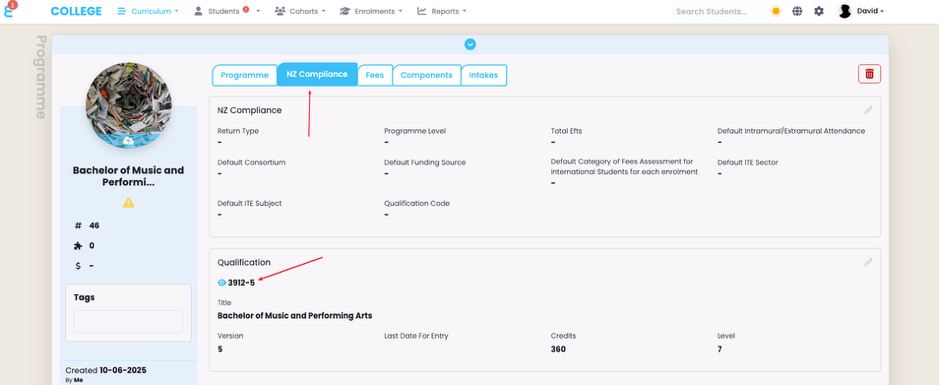
The created Programme now appears under “Curriculum -> Curriculum Index” and when you open it, you will see that it is linked to the qualification:
A screenshot of a computer

AI-generated content may be incorrect.

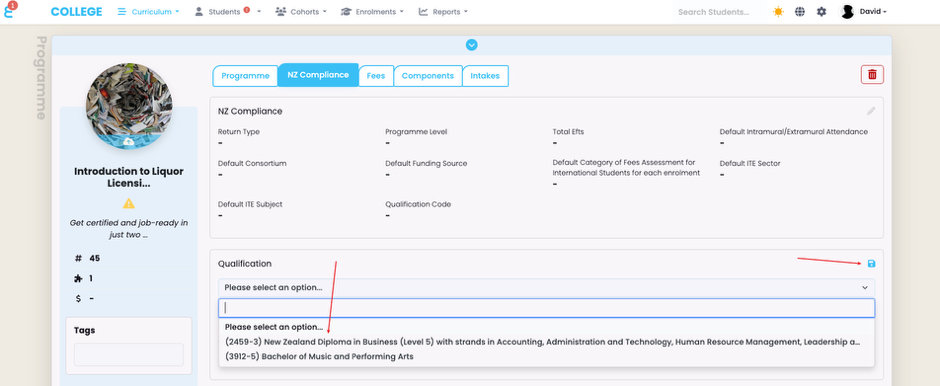
Like with the unit standards, you can also link an existing programme to a NZQA qualification from the NZ Compliance tab:
A screenshot of a computer

AI-generated content may be incorrect.

Having a qualification linked to a programme is a pre-requisite for qualification reporting to NZQA.

Related Articles

7. NZQA Unit Standards

Table of Contents NZQA Units & Quals Import Unit Standards Import Qualifications Unit Standards Management Creating a component from the Unit Standard Linking a Unit to a Component Updating a Unit (Version) on a Component NZQA Units SELMA supports the import and management of NZQA unit standards and qualifications. If enabled in your SELMA instance, …

1. Curriculum Items and Notes 

On this page: Curriculum Overview At a high level, SELMA manages two different Curriculum items – Programmes and Components. Programmes are structured pathways through which learners can develop specific skills and receive recognised certification from your institution. A programme can be: Components make up the structure of a Programme and are organised to deliver specific …

5. Completion Rules

Overview Completion Rules are automated rules which perform tasks for you at the Enrolment level, when students complete components. They have conditions (criteria) that must be met to run actions (effects), both of which you can customise. Note: When you navigate to the Curriculum Index you can choose a Programme to view. Click on the …

3. Programmes

Programmes are the structured educational pathways or qualification process through which learners can develop specific skills, and receive recognised certification from your institution. A qualification can be awarded as a certificate, diploma, bachelor’s degree, etc. On this page: Create New Programme There are a few steps required to create a new Programme with complete and …