In this Section:
- Recognition of Prior Learning (RPL)
- Cross-Credits
- Programme Completions (NZQA Qualifications)
- Changing End Dates
- Fees – SDR versus SELMA Records
- SDR Committed Date
- Mixing Funding Sources in an Intake
Recognition of Prior Learning (RPL)
A Student can get a RPL if they completed a course partway. They must claim an RPL to complete the remainder of their course, and your provider must reduce the EFTS and Credits depending on how much is remaining.
- RPL is recognised by the TEC.
IMPORTANT NOTES:
- EFTS and credits should be reduced by you, the provider – not SELMA SIS.
- Do not mark an enrolment as “X” or “Cross Credit” as this is unrelated to RPL and is not recognised by the TEC.
- We recommend marking an Enrolment with a note that indicates RPL.
Cross-Credits
A Student can complete one or more courses with another provider and have their achievement/s recognised by you on their transcript.
Set Component Codes “X” or “Cross-Credit” on the relevant Enrolments so that they are included in the Student’s transcript. Doing so will ensure the Enrolments are excluded from the SDR report, (only completion codes 0-8 are included in SDR Reporting).
- Cross-Credits are recognised by the NZQA.
Programme Completions (NZQA Qualifications)
Programme completions must be reported to NZQA as a QE1 file, manually.
- Please refer to NZ Compliance – NZQA Qual Reporting (QE1) for more information.
To help, SELMA can generate a text file including batches of students and their associated Programme completions, which can then be uploaded to NZQA.
Note: You can not report to NZQA if the Programme (Qualification) is not made up of unit standards.
Changing End Dates
Enrolments
It is possible to update the Component End Date to the Component Completion Date; however, depending on the date change, this can affect your Completion Rate, your funding consumption, and trigger SDR errors. Only follow this practice if you are aware of the impact, and can apply it consistently to all Student Enrolments.
IMPORTANT NOTES:
- We highly recommend contacting the TEC before changing Component End Dates.
- Avoid changing Enrolment Start and End Dates
Enrolment Components
DO NOT change the Dates of Enrolment Components – Once an Enrolment Component is reported in a December SDR, the Start and End Dates of the Enrolment Component should no longer be changed as it will result in errors in the next SDR submission. These errors can only be resolved by reverting back to the SDR committed dates.
Note: If you do not know the dates to revert to, the SELMA team will have to spend considerable time to review the logs and find them for you.
Enrolment Extensions
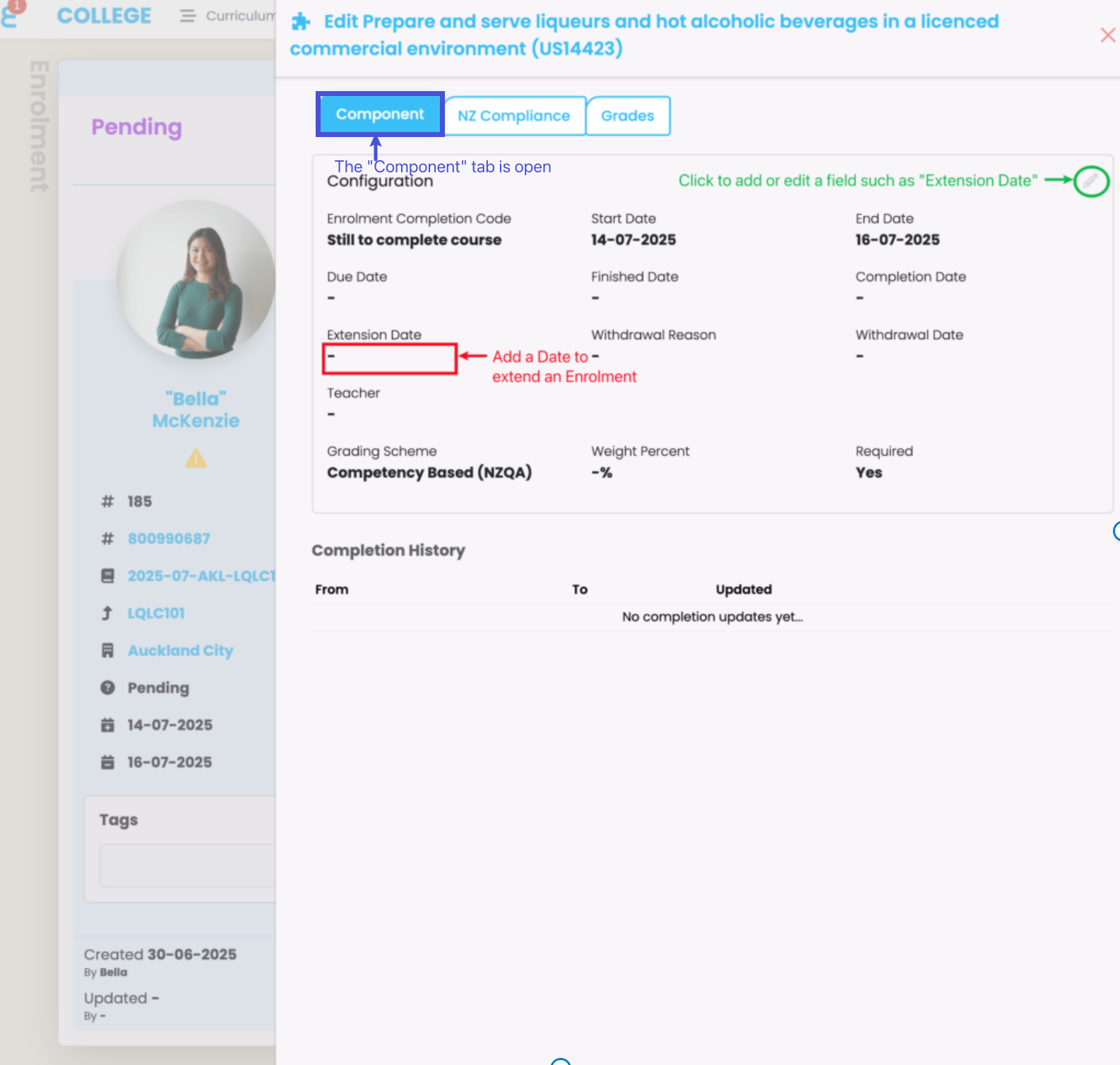
While you cannot change Enrolment Component dates, you can and should change an Enrolment End Date to account for Enrolment extensions.
Figure 1i. Open the Enrolment tab on a select Enrolment profile, and click the “Actions” button to edit an Enrolment Component (green).

Figure 1ii. On the Component tab, click the pencil icon (green) to add an “Extension (End) Date” (red).
Fees – SDR versus SELMA Records
There are two distinct types of fees in SELMA:
- SDR-related fees
- To include fees in an SDR report, navigate to the “NZ Compliance” tab of a Component profile, and fill out the “Tuition Fee”, “Foreign Fee”, and “Compulsory Course Costs” fields.
- The details provided in these fields are inherited by new Intakes and Enrolments.
- To include fees in an SDR report, navigate to the “NZ Compliance” tab of a Component profile, and fill out the “Tuition Fee”, “Foreign Fee”, and “Compulsory Course Costs” fields.
- SELMA-recorded fees
- The “Fees” tab, as seen on the Programme, Component, Intake and Enrolment profile pages, is for your provider to keep track of costs and send invoices to Students in SELMA, only. Details on this tab will not be included in SDR reports.
SDR Committed Date
SELMA calculates an SDR Committed Date, which determines the SDR period you can select for SDR extraction. This date can be found on an individual Enrolment Component and is non-editable (Figure 2i-ii.).
The date is either 10% of the duration after the Component start date, or 30 days after the Component Start Date, whichever is earlier.
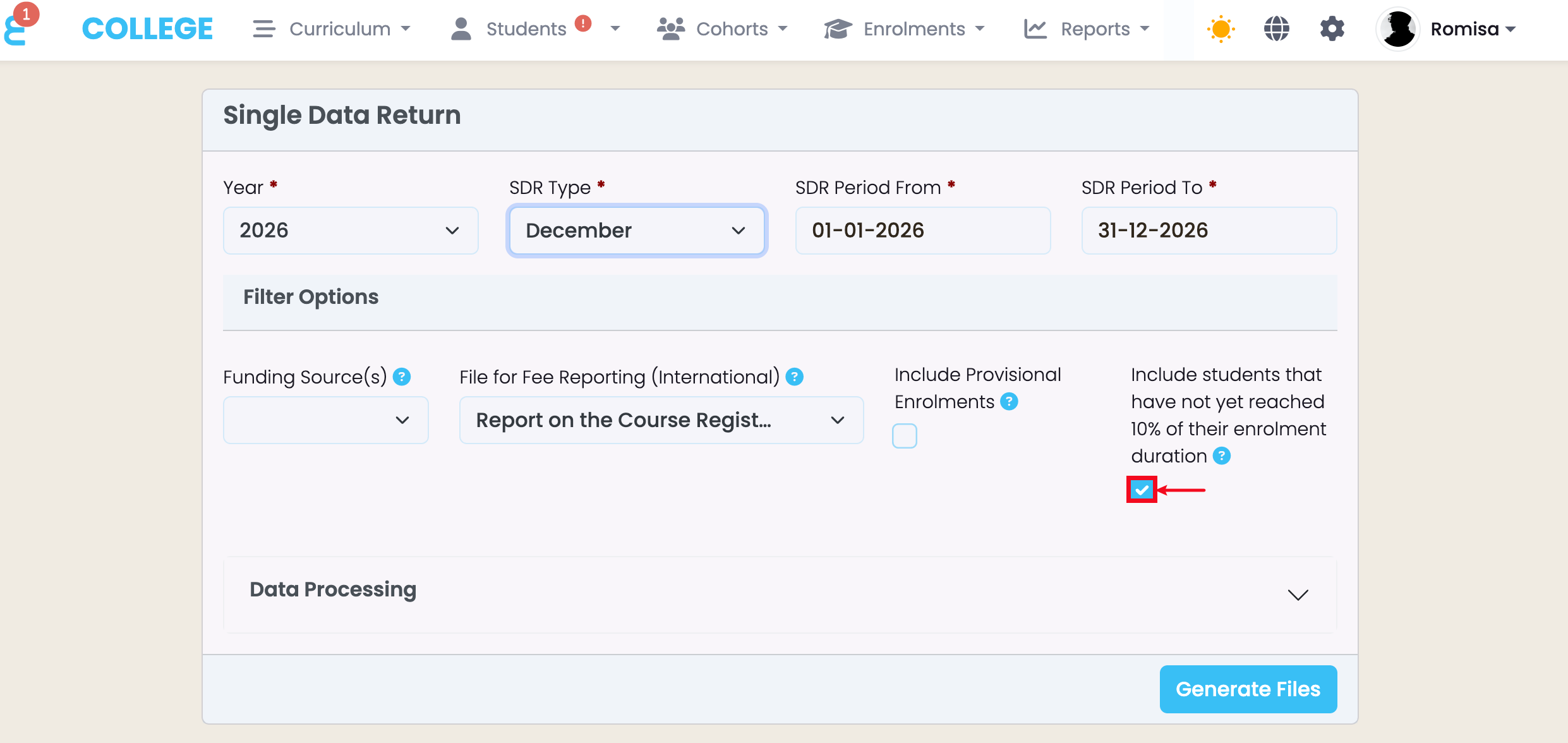
You can include or exclude Enrolments that have not yet reached the SDR Committed Date (Figure 3.).
Figure 2i. Click the “Actions” button indicated by the pencil icon next to an Enrolment Component (red).
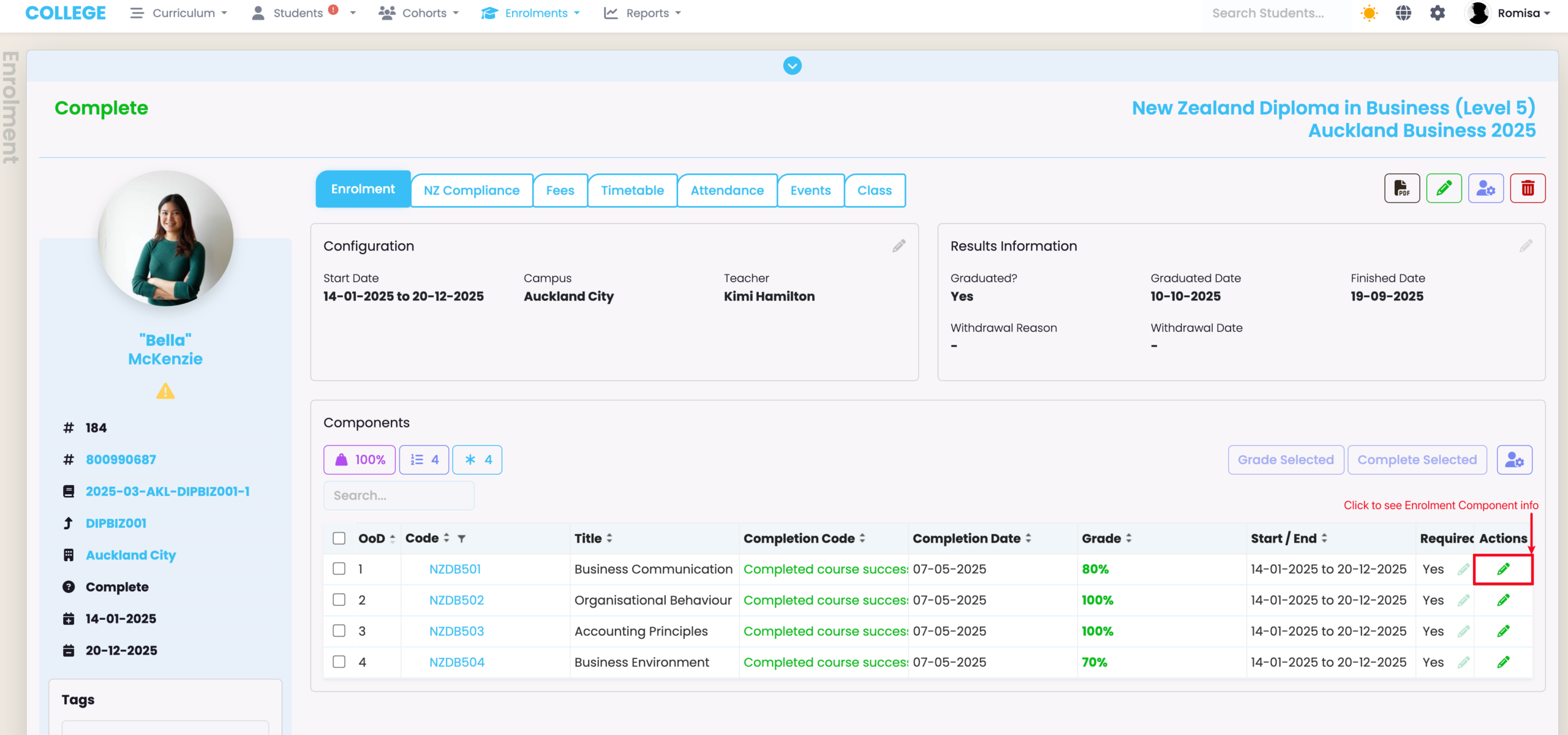
Figure 2ii. Open the “NZ Compliance” tab of an Enrolment Component (blue), and see the “SDR Committed Date” (orange).
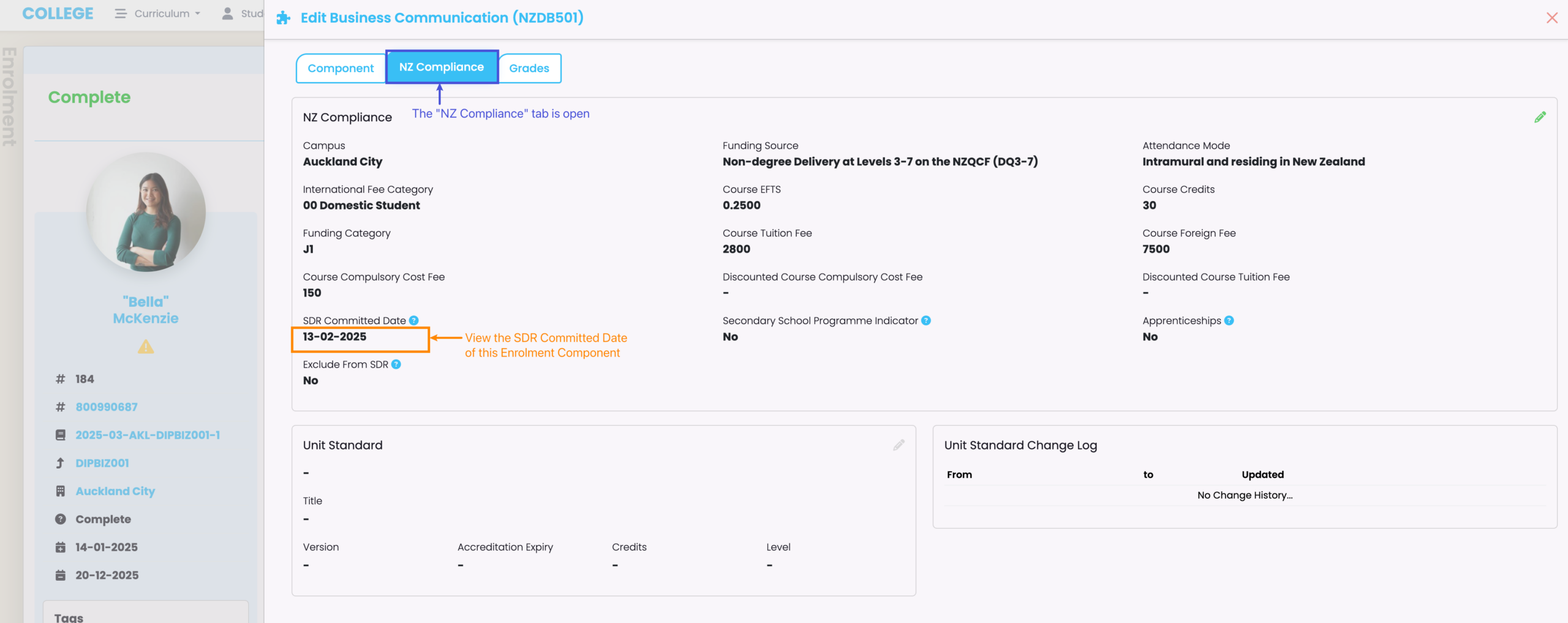
Figure 3. When filtering for a new SDR report, the button below is selected by default (red) and will include Enrolments that have not yet reached the SDR Committed Date. Click it to exclude those Enrolments.
Mixed Funding Sources in an Intake
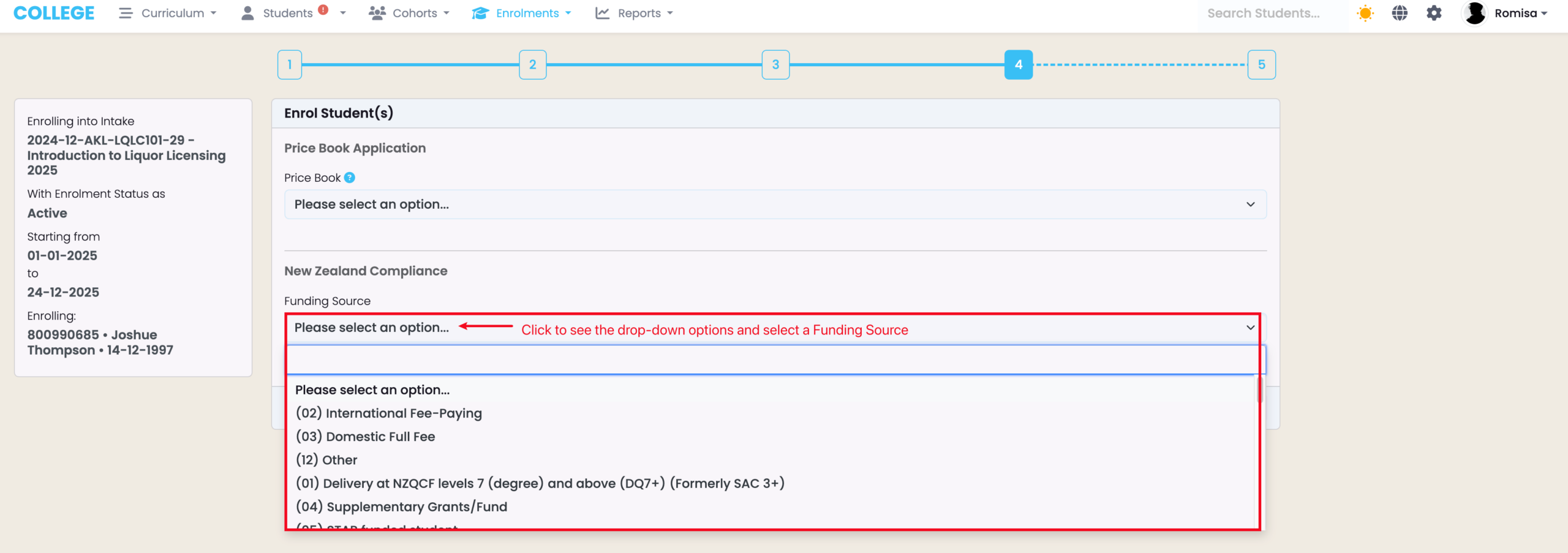
When creating a new Intake, you should set a Funding Source that applies to all or majority of Enrolments. You can then set another Funding Source for individual Enrolments, if an Intake has Enrolments with mixed Funding Sources (Figure 4i-ii).
Note: When creating a new Enrolment, you can select a new Funding Source which will override the inheritance of an Intake’s Funding Source (Figure 5.).
Figure 4i. The Funding Source of an Intake (red) can be edited (green). This should be the Funding Source that applies to all or majority of Enrolments.

Figure 4ii. Use the Compliance tab of an Enrolment to change individual Funding Sources.
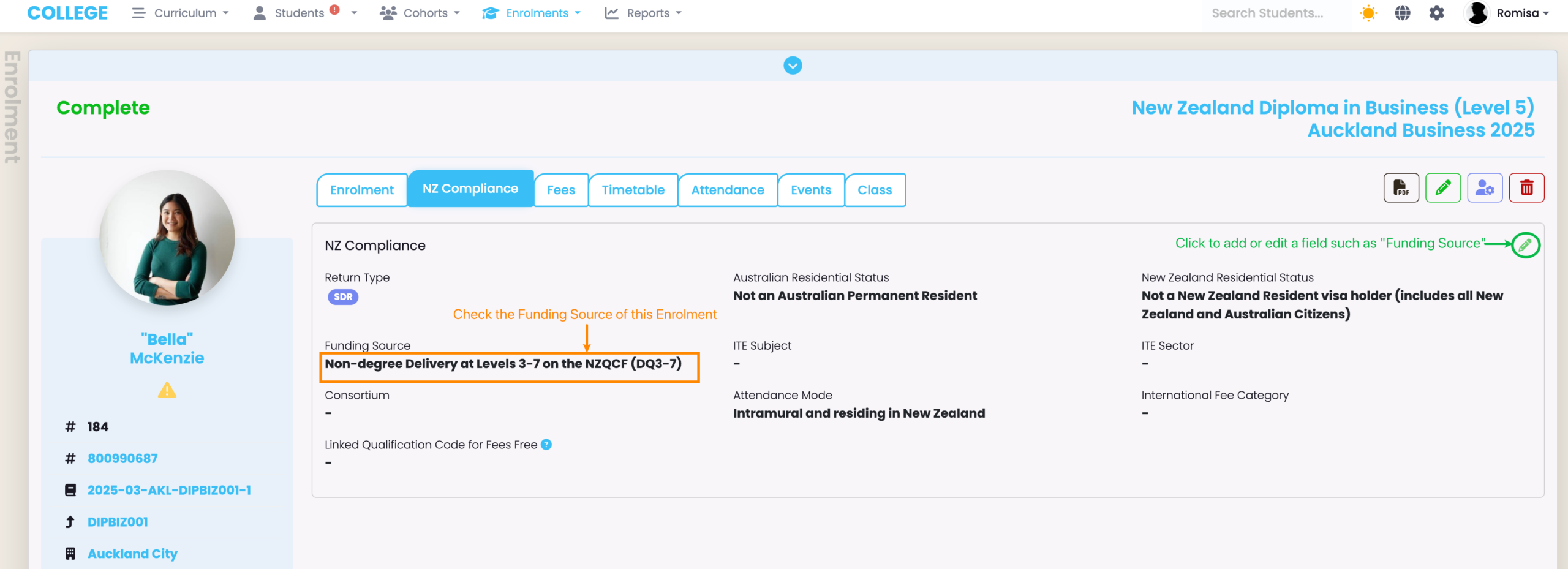
Figure 5. When creating a new Enrolment, you can select a specific Funding Source to override the default Funding Source transferred by the linked Intake (red).