Intake Scheduler

In this Section:


Scheduler Tab

The Scheduler tab on an Intake is used to create schedules for:

  1. Internal Enrolment assignments for your staff members
  2. Sending emails to Students using Communication Templates

Create Enrolment Event

An Enrolment Event assigns notes and tasks to staff members, within SELMA.

Figure 1. Set Enrolment Event Parameters and Outcomes

Create an Enrolment Event by providing the details necessary for the schedule to run, and result in the necessary outcomes (Steps 1-2).

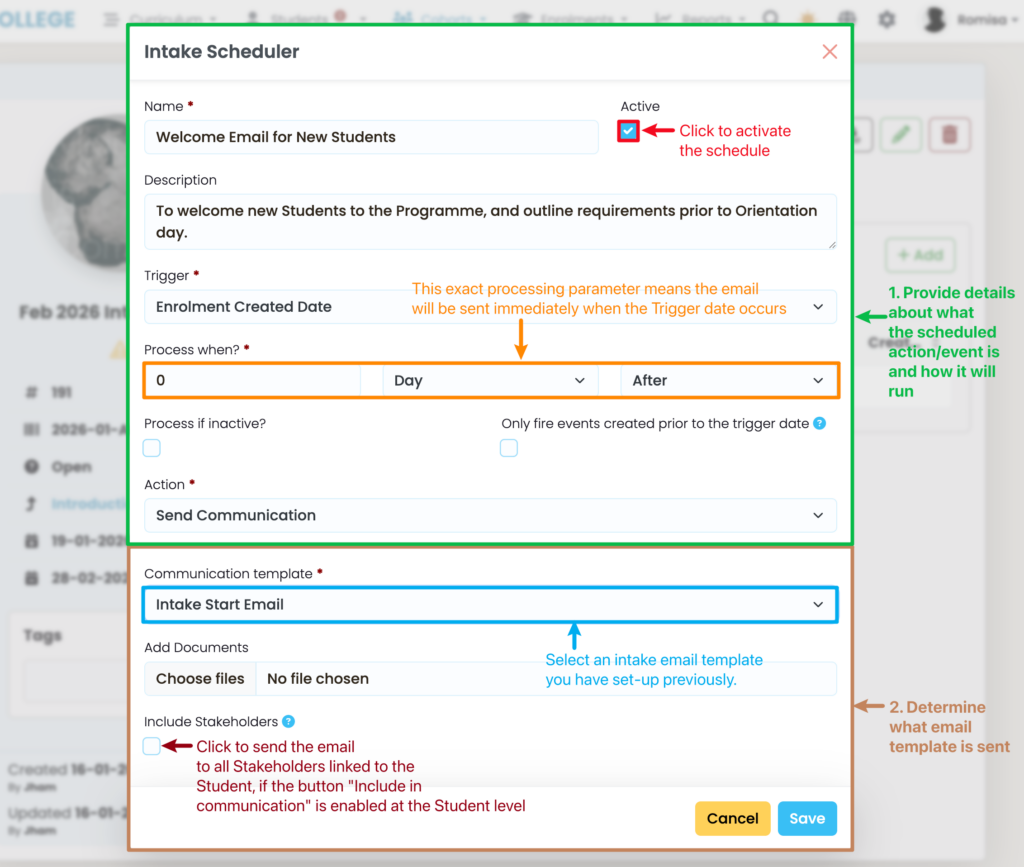
Send Communication

This action sends an email to Students enrolled within an Intake, externally.

Figure 2. Set Email Parameters and Outcomes

Related Articles

Email Students

This article highlights how to email students out of SELMA. For further details on setup of email templates, please refer to Communication Templates. Send Email – Individual Student In the student index select the student you wish to email: In the student profile click on student actions icon and select ‘Send Email’ Complete the email …

Send to Cohorts in Bulk

For further details on setup of email templates, please refer to Communication Templates. Sending Emails in Bulk Select the relevant intake you wish to communicate with allocated in your Intake Index Click on Enrolments – Select the enrolments you wish to send the email to by clicking on the tick boxes Click on the purple …

Setup Text Templates

For further details on setup of text templates, please refer to Communication Templates. Access Communication Templates -> Settings Click on ‘New’ and select Text Template – Complete the relevant template details There are various merge fields available that you can insert into the text template. These fields will be populated with the corresponding information you …

Send Text Messages

For further details on setup of text templates, please refer to Communication Templates. Texting Students In the student index select the student you wish to text – In the student profile click on student/cog icon and select ‘Send Email’ Complete the text details and select the relevant text template – Then click on ‘Send Text’ …